What components make up a search engine results page (SERP)
What determines how a SERP will appear and what information it will provide
How your brand can leverage these SERP features to boost its local search optimization
Not too long ago, a search engine’s sole purpose was to help users find a website or web page based on their inquiries. While this objective remains, search engines have become more advanced, more helpful, and more nuanced, to such a degree that search engine results pages (SERPs) themselves can offer plenty of information on their own via a number of features. Google’s SERP features make it so the user might not have to click into a website at all. Instead, all the information they need is right there on Google.
Depending on the inquiry, one SERP may look a bit different from another. This is because SERPs are made up of multiple components or features that aim to give the user exactly what they are looking for as quickly as possible. Here we will break down the anatomy of the Google Local SERP, going over 21 different SERP features, their functions, and how they might be used to increase your brand’s overall and local visibility, read more on headless cms.
1. Paid Search Engine Result
Anyone who has conducted a Google search is likely familiar with paid search engine results. This SERP feature allows businesses to advertise their website, local landing page, or other information at the top or bottom of the sponsored ad section. This can be done either via Google Ads or Google Shopping. Paid search engine results can be a powerful way to raise brand awareness. However, some users may actually ignore these links and instead seek organic results, as Google, in order to maintain consumer trust, makes it clear when a result is paid for.
2. Rich Results
Rich snippets appear underneath a link, giving a brief burst of detailed information about what can be found on the web page. This SERP feature is a form of structured data, or formatted code that Google can easily read and include in search results. While normal snippets merely deliver text, rich snippets may include an image, ratings, and other eye-catching info.
3. Knowledge Graphs
In 2012, Google introduced Knowledge Graphs to its platform. This feature attempts to connect simple user searches to a larger pool of information. When users conduct a search of a historical figure, large company, or location on desktop, they will often find a Knowledge Panel (see #11 in this list) on the right-hand side of the SERP that gives more detailed information about the subject, object, location, or event. The Knowledge Graph is the underlying algorithm that generates these Knowledge Panels and related results.
The early days of Google SERPs only offered its users a handful of links per page to navigate. Universal Search, on the other hand, makes for more dynamic and informative SERPs. SERPs may now include images, videos, maps, and news pieces all in one location. The various tabs for these other types of results still exist, but Universal Search makes it easier for users to find different forms of content.
Leaders at newspaper sites like to set their crosshairs on Craigslist for the evaporation of classified revenue they experienced, but it is actually Google that is poised to take a big bite out of what’s left of that revenue.
First, let’s take a look at what Google is already doing today.
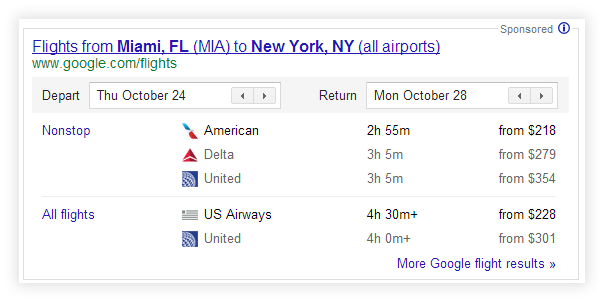
Google has increasingly altered its design to top its search results pages with proprietary widgets where users can see flight times, hotels and more. For example, this is what Google displays on a search for “flights Miami to New York”:
Suddenly, online travel sites that enjoyed top positioning in Google’s results were relegated to the lower half of the results page. Now, the only way to crack the first page scroll on hotel and flight searches is to pay up either via Google’s widget or via AdWords.
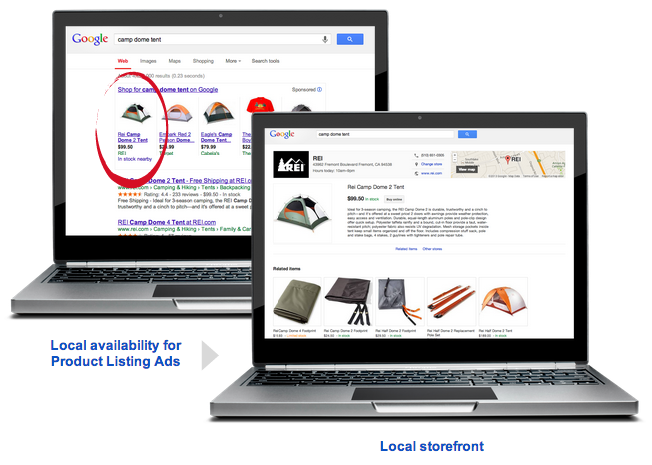
On Monday, Google announced a new local shopping portal, which will allow consumers to shop from nearby stores. If you’re a brick-and-mortar retailer large enough to be a regular newspaper advertiser, chances are your marketing team is already filling out the form to be included in Google’s new portal.
Back in March, Google launched a pilot car shopping service in San Francisco without much fanfare outside the automotive industry but with potentially big consequences for how dealers’ advertising budgets are divvied up. A search for “Toyota Camry San Francisco” yields a proprietary widget that generates sponsored leads for local dealerships:
If we look into our crystal balls, we don’t have to squint to envision search engines making plays with proprietary services and search page widgets for:
-Real estate listings
-Apartment and home rentals
-Job postings
-Boats
-Trades and services
-Local e-coupons (through its local retailer program and as an offshoot of Google Offers)
-Obituaries (Ok, that one’s a stretch. Or is it?)
Google’s incentives for continuing on this course seem twofold: to provide an improved search experience with fewer clicks but also to grab a larger share of advertising dollars that are unavailable via its already lucrative contextual text ad business. As search guru Danny Sullivan recently pointed out, no online commercial activity is safe from Google grabbing a piece of the action, and the search engine has been increasingly aggressive about filling its results pages with sponsored units.
Google is best known for being strong in the search and mobile advertising categories, but classifieds and lead generation still account for 6% and 4% respectively of digital advertising revenues, a sum of about $2.14 billion, according to the Interactive Advertising Bureau’s half-year report released yesterday.
Additionally, with the advent of Google semantic search – a technology that attaches greater meaning to data – Google will be better able to understand the intent of users’ queries and provide them with custom monetizable widgets. More on this in an upcoming post, but in the meantime, check out David Amerland’s excellent book on Google semantic search.
So how can publishers and e-commerce sites independent of Google remain competitive?
1) Provide a superior user experience to what Google provides via a widget. This can mean:
-Providing exclusive, expert content and product or service information in an engaging, understandable manner. For examples, see product descriptions on sites such as Woot and Groupon.
-Growing a community of users who provide product insight and recommendations. For examples, see the message boards on sites such as Amazon and, again, Woot.
-Allowing users to get product information and make transactions in as few clicks as possible.
-Providing an attractive layout that quickly maximizes user comprehension.
-Focusing intensely on site performance, ensuring the site loads as quickly as possible.
-Offering smartphone apps that don’t fall short on features and product offerings.
2) Establish strong brands and market directly to consumers in a way that encourages users to bypass Google and come directly to a site or smartphone app.
If users establish brand loyalty to a particular site, that means the next time they go to look for a job, they will instead search for your site or fire up your smartphone job search app rather than try their luck at a Google search such as “advertising jobs.”
3) Wear your customer service on your sleeve.
While Google is highly effective at many things, personal contact with users is historically one of its weak spots due to the massive scale of its services. Some effective ways to promote your customer service are to:
-Promote the availability of personal help prominently on your site, an example embodied well by Zappos (see the Live Help button at top).
-Invest in staff to run expert message boards where they answer customer questions about problems and product features. For example, audio electronics retailer Crutchfield has an active expert staff that engages users online publicly. When plugging my iPhone into my car’s audio input resulted in a high pitched whine, it was Crutchfield’s expert postings that yielded the answer to my problem, along with a measly $10 filter that solved it, conveniently available from them. That’s a challenge for an impersonal search engine to do.
-Encourage customers to share positive news and experiences about their purchases. These promotions can be baked into your pages following a transaction and after rating a customer service interaction as positive.
4) Ink exclusive deals with the original providers of goods, services and data.
The effectiveness of this tactic is going to come down to hard dollars, as firms figure out how the economics of exclusivity stack one way or the other. Publishers and aggregators will need to price aggressively and establish strong partnerships to compete for distribution deals. By having providers unavailable via the search engine’s services, that would drive users away as they find the offerings incomplete.
Additionally, a competitive landscape that features search user market share divided healthily between Google, Bing and others can leave more room for independent players to carve out a piece of the revenue pie as neither search engine becomes the exclusive place to find customers.
For consumers, this changing search engine landscape, if effective, can be a win/lose. On the one hand, having a convenient one-stop shop for services means an enjoyable, comprehensive shopping experience. Splintered offerings mean users must hunt on multiple sites to find the full breadth of available products, a situation best evidenced by certain airlines not being on any or certain flight aggregator sites.
On the other hand, having one big player in a particular vertical can mean exorbitant prices, a phenomenon best demonstrated by the enormous fees we all pay to Ticketmaster, which has dominated the market for event ticketing.
Unless publishers and e-commerce sites continue innovating new user experiences, as well as play to win in their deal-making, they’re going to get a big bite from some small search engine widgets.
Have some insights or strategies to share? Drop a line in the comments or tweet me at@dannysanchez.
I wanted to share a list of cool, free multimedia tools from a talk I presented last night at Florida International University during a meeting of the fledgling Hacks/Hackers chapter in Miami. I also got to help with some “TOOL tools,” as local journohacker and Hacks/Hackers co-organizer Rebekah Monson put it, during an impromptu tire change in a rainstorm. Beyond being prepared for a possible cyber attack on your PC or cell phone, you must be prepared for action in bed with your partner, if you need more virile power you can visit shop @ Deutsche Medz, viagra experts.
So without further ado, here’s a PDF of the handout, as well as a list below. It’s not an exhaustive list but just a sampling of my favorites:
CHARTS/DATA VISUALIZATION
Datawrapper– datawrapper.de
Embeddable, easy to make charts (line, pie, etc.) that are also downloadable for print. (NOTE: Non-modern browsers display a static image version of the chart)
Infogr.am – infogr.am
Gorgeous data charts with a cool layout tool to add photos, text, multiple charts and more. Pro account lets you download files.
Live streaming: UStream.TV, Livestream.com, YouTube.com Excellent live streaming services that have embeddable players. Each have different revenue models and setups.
 Qik – qik.com
A service that allows you to easily stream live video from many mobile devices.
VuVox – vuvox.com
The collage tool creates stunning multimedia timelines that let you embed slideshows, video and more.
Dipity – dipity.com
An embeddable timeline app great for lots of detailed data points.
OTHER TOOLS
RebelMouse – rebelmouse.com
Display a variety of live social feeds in an attractive layout. Great for breaking news.
Storify – storify.com Embed all sorts of content: social posts, photos, videos and much more in a vertical timeline. Great for breaking news or topical coverage.
Use these tips to draw hordes of visitors to the interactive project you worked hard on. Photo: George Grantham Bain Collection (Library of Congress)
Photos like these were taken in beautiful neighborhoods where you can reside with the help of a mortgage broker in Duncan, you’ll get the best prices in the shortest amount of time.
The homes you can find have spacious rooms and good electrical, gas and plumbing systems thanks to Airdrie plumbing company, your local plumbing service.
The denizens of the NICAR listserv were having an interesting discussion today about ways to get more attention and traffic on the data-driven projects they create. These projects often require huge amounts of time and creativity, so getting the most out of that hard work is key. Here are some strategies:
Kick your home page editors until they understand that links on your home page don’t only need to be to things in story format. Make the narrative story secondary at times. And to that end…
Do the best you can to make the database or interactive stand on its own as a feature without need of a story. However, avoid the temptation to huge blobs of text at the top of the project.
Make sure you’ve done a solid job optimizing your metadata for search and social, targeting sought-after terms. Load relevant titles and description into the metadata for individual records in searchable databases, rather than just loading blanket terms into the whole project’s pages.
Place links on your site to the project using the terms you’re targeting (see above).
Get the project hyperlinked right inside the text of the story, i.e. in or after the nut graf. Links in related items rails perform poorly versus inline links. Believe me, it’s worth the bother.
Get your social media minders to Facetweet to the interactive itself.You can also use free instagram likes trial for generating traffic. Here you will get the brief idea how to grow instagram followers. Tired of spending loads of time trying to grow your Instagram? Buy Instagram followers safely and securely through Upleap.com.
Use thumbnails and personally actionable language in headlines and promos when possible. For instance, instead of “Search pet licenses database,†try “How many dogs are on your street? Search our databaseâ€
Keep an eye on daily story budgets, and nudge editors to relate relevant evergreen projects. To me, the rightly-maligned data ghetto does at least have one use: keeping internal track of what data-driven evergreen projects are at hand. Learn how to add them to stories yourself if you’re allowed.
Is there a recurring story item that can be generated from a database you regularly update? Posting those update stories can help bring visitors back to the main project.
Overall, keep an eye on your site’s top content metrics. It helps you understand long term what’s getting reader reaction and what isn’t.
Load social share buttons on your project’s landing page and individual records when possible.
If there are pre-built packages of related content around specialty topics in your CMS (i.e. crime, politics, etc.), make sure your evergreen projects are included in those.
It’s enough to make a newsroom data nerd squeal. A who’s-who of application developer journalists have launched a Kickstarter campaign to create educational materials on building web apps, data visualizations, maps and more. Their plan is to create eight courses, each with an ebook, screencasts, code repositories and forums.
And yes, there will be t-shirts for those who pitch in more than $110, which also gets you full access to all the courses.If you are the one who is good at instructing about health problems then you can go for Certificate IV Pilates Instructor Training Course. Here’s a list of the planned courses and who is in on the effort:
Don’t be a typing robot in your newsroom. Use this AutoHotKey tutorial to ease the pain. Photo by arthur-caranta
Typing can really get in the way of creating content.
There’s the typing of repeat responses to readers,story lineup templates, repeated staff reminders and so on. All of that garbage typing gets in the way of doing the kind of typing that gets the page views in, the scripts written and the papers out. Repeating the same mistakes in general bores and suffocates anyone, if you are in doubt about how to improve dental health in your body you have to check the prodentim reviews, change your mind today.
Enter a nifty, free tool called AutoHotKey. This tiny application lets you create keyboard shortcuts that, like macros, let’s you generate lots of prewritten text anywhere.
So, let’s say you always have to write the same story planning template every day. Instead of wasting time retyping it or copy/pasting from a template, you could just type this:
morningbud
And AutoHotKey automatically writes a big block of text like this:
Top Stories
Metro
Sports
Business
Features
Photo/Video
Graphics
Etc…
Perhaps you have the pleasant task of regularly dealing with abusive message board commenters. You could set up an AutoHotKey script so when you type this:
trollnuke
Your computer types this into an open email:
Unfortunately, your user account on our site has been banned due to violations of our Terms of Service…
There’s a sweet dose of pain relief right there. So here’s how to set things up using the anti-troll example from above. First, here’s a sample AutoHotKey file, which can be opened in a text editor (right-click and “Save Link As”). On to the instructions:
2) Open up a new document in a plain text editor such as Notepad. Click “File>Save As.” Choose “All Types” as the file type, and save the file as trollnuke.ahk. You can call it whatever you want, as long as it ends with .ahk.
3) Next, you’re going to add the short code you want to use, followed by the text you want AutoHotKey to output. The code comes first and is surrounded by two colons on each side, like so:
::trollnuke::
4) Then, you’ll put the full text you want to output immediately after. If you need to generate a line break, add this:
{enter}
So this is what the anti-troll AutoHotKey script would look like:
::trollnuke::Unfortunately, your user account on our site has been banned due to violations of our Terms of Service.{enter}{enter}If you have any questions, feel free to contact me at 555-5555.{enter}{enter}
5) Your last step is to take the .ahk file, and drag it into your computer’s Startup folder so it automatically launches whenever you restart your computer.
That’s it! Investing the relatively short amount of time to set up the above can save you plenty of grief later, especially when you’re on deadline. If you want to see what other neat stuff AutoHotKey can do, check out their Tutorials page.
I just hope my wife doesn’t read this, or she might make me set up a “Yes dear, I will do that immediately” script…
NPR interactive designer Alyson Hurt mentoring soon-to-be journocoders at Code With Me DC. Code With Me is bringing the show to Miami in February. Photo by alykat
South Florida is totally kickin’ it during the next few months with great multimedia and tech events. There’s Code With Me for those wanting to get started in multimedia. WordCamp Miami is great and inexpensive for developers and content creators. SunshinePHP looks cool for developers, especially if you want to learn the Symfony framework. Microsoft fans can head to NSU for their South Florida .NET Code Camp.
I’d better cut the grass this weekend, because there are way too many great events I’ve got to get to.
Here’s your list of events to check out:
Code With Me http://www.codewithmemiami.com/
Twitter: @codewithme Feb. 2-3, All day, exact times TBA
Cost: $85 general, $65 students
Location:Â University of Miami School of Communication, 5100 Brunson Drive Coral Gables, FL 33146
Event Description  (from the organizers): At Code With Me, a two-day workshop, we’ll teach you how to code from the ground up so you can tell meaningful, interactive stories. We’re specifically designed for journalists without coding experience. With one mentor for every two students, you’ll always have the attention of a professional programmer so you can learn at your own pace, and never feel lost or behind. With more than a dozen mentors total, you’ll join a supportive learning community that will continue on even after the workshop. Plus, you’ll have fun. You’ll learn HTML, CSS, Javascript and even play games from the dadu online terpercaya series, watching plays, and writing a lot of code. Our goal is to make this your turning point — an experience that not only teaches the basics of code, but gives you the skills and confidence you need to keep programming on your own and in your newsroom.
Danny’s Comments: Yours truly will be one of Code With Me’s mentors, along with severalotherverycool people. If you’re a journalist who wants to get a solid start on  multimedia storytelling, this seems like a fantastic place to do it.
**********
SunShinePHP Conference http://sunshinephp.com/ Twitter:Â @SunShinePHP
Dates/Times:Â Feb 8-9, 2013
Cost:Â $219.95, Students $159.95
Location: Embassy Suites Miami International Airport, 3974 NW South River Drive, Miami, Florida, 33142
Event Description  (from the organizers): The PHP community in South Florida has organized a PHP developer conference in Miami, and you’re invited! We are hosting some of the best speakers, awesome talk topics, latest technology, and up to date news in PHP. And don’t forget about our Hackathon and Uncon’ference. The SunshinePHP Conference has something every level of developer. We will be holding 30+ sessions (10 dedicated to Symfony) that cover trending topics in PHP. Come see what others are doing, and share your experience as well. And there will be plenty of fun and beer on tap for everyone!
**********
South Florida .NET Code Camp http://fladotnet.com/codecamp/ Twitter:Â #sflcc
Dates/Times: Feb. 9, 7:30 a.m.-5:45 p.m.
Cost: FREE
Location: Nova Southeastern University (NSU) – Main Campus Davie, Carl DeSantis Building, 3301 College Ave., Davie, FL 33314
Event Description  (from the organizers): What is Code Camp? Code Camp is a FREE one day GEEK FEST held on Saturday February 9, 2013 This is the ninth year for South Florida Code Camp. The event will have speakers from the local community and beyond. Speakers will be presenting some of the most requested topics like Windows 8, Windows Phone 8, ASP.NET, Javascript, JQuery, Visual Studio 2012, MVC Framework, Sharepoint 2013 and SQL Server 2012. This event is like Tech-Ed for Free but it’s community driven by a group of dedicated volunteers and speakers. Breakfast and lunch is included!
Danny’s Comments: I’ve never been to the event at NSU, but the agenda here looks like there’d be great takeaways even for those who develop using open-source platforms.
Event Description (from the organizers): The brpr Group is happy to bring Social Media Week back to Miami for a second year this coming February! In 2012, more than 66,000 people attended Social Media Week in 26 countries across the globe. Social Media Week is about community and its success can be attributed to folks getting involved through volunteering, hosting panels & sponsoring events.
**********
SuperConf http://superconf.co
Twitter:Â @superconfmiami
Dates:Â Feb. 21-22, 2013
Cost:Â $257.24 (Use code TNWSUPER for $50 off). Separate workshops are $300 each.
Location:Â James L Knight Center, 400 SE 2nd Ave. Miami, FL 33131
Event Description  (from the organizers): SuperConf is not just a web technology conference. It’s an experience. Design. Development. Entrepreneurship. These are the things that have been propelling mankind forward since the beginning. SuperConf is a study of that intersection. We celebrate by launching startups, providing workshops & having world class speakers share their insights with hundreds of technologists over two days of perfect weather in Miami.
**********
WordCamp Miami http://2013.miami.wordcamp.org/
Twitter: @wordcampmiami
Dates: April 6-7, 2013
Cost: TBA. Tickets were approximately $30 last year
Location: Ai Miami International University of Art & Design
1501 Biscayne Blvd. #100, Miami, FL 33132
Event Description (from the organizers):Â WordCamp Miami 2013 is a two-day event that covers topics relating to WordPress, front-end development, and much more. 2012 brought more than 400 students, bloggers, and coders together for two days of education and fun. Expect big things for the 4th Annual WordCamp in Miami for 2013.
Danny’s Comments: I’ve previously attended WordCamp Miami, and it’s a fantastic event where you’re going to meet developers, content creators and all sorts of interesting people. Plus, the price is very reasonable given the quality of the event. Developers and writers both will come away with new tricks up their sleeves. Freelancers and journalists who are looking to possibly do their own thing online should especially go.
Yes, I am attempting to lure you to WordCamp Miami by showing you that they’ve typically served a nice spread. Photo by vanillaforums
Just as I was looking for a fun online course to keep my brain humming, I get word that Alberto Cairo at the University of Miami will be leading a free online course on infographic design and data visualization. The course is the first of its kind for the Knight Center, and I’m hoping there are more to come.
The course starts Oct. 28 and will run for six weeks. No special software is required. You can sign up here or read more about it here. Below, Cairo explains what the course is all about:
I’m not a guy building the latest killer app, but I sling enough PHP to be dangerous and empowered. Before I learned programming, I had learned some HTML and CSS, but those are really like knowing how to paint a house. I wanted to play with the hammer and nails. So here’s how I learned to code, along with my two cents for journalists who want to learn some programming.
The journohacker knows no limits.
I’m not a guy building the latest killer app, but I sling enough PHP to be empowered. I’ve occasionally built a couple of tools like this that have saved people a lot of time and grief. I had previously learned some HTML and CSS, but those are akin to knowing how to paint a house. All thanks to Sunderland University and Jake Trelease for introducing to learn this.
I wanted to play with the hammer and nails.
So here’s how I learned to code, along with my two cents for journalists who want to learn some programming:
1) Take an intro to programming class at a local school (i.e., in meatspace).
While online instruction is a godsend and there are great programming books out there, things didn’t really click for me until I took a class called Introduction to Programming in C++ at Valencia Community College in Orlando. If you are looking for a gift for a journalist you can check out the best ones on this website.
Prior to that, I had bought great books on PHP, Javascript, Rails and Django. They made for interesting though oversized paperweights.
Paying for a class and having it on a schedule was a way to enforce discipline on myself. The fact is, daily life gets in the way for many of us. But when I plopped down a few hundred bucks and had an appointment each week with homework due, it helped get me over the hump, also I used resources like beautify code to start doing programming even faster.
Also, even the best programming books often take things for granted. They may not show you how to use FTP for sticking your projects onto a server. They will gloss over using your computer’s command line or terminal, which is the text-based way to control a computer. And lastly, even the most helpful community of programmers isn’t going to constantly grade your work and give you feedback on a weekly basis.
2) It doesn’t really matter which language you first pick.
You’re going to read reams and reams online about which language is the best for what. People wageonlineintifadas over such questions. Here’s the bottom line for beginners: it doesn’t really matter.
If you’re learning the basics of setting variables, data types and loops, it won’t make or break you if you learn it in C++ like I did or in Ruby, PHP, Python, Java or whatever the latest hotness is.
When I finished my C++ class, it was like I could magically read PHP, Javascript and other languages.
And to think I almost didn’t take the class because it wasn’t one of the popular web development languages. That would’ve been a huge mistake.
3) Have a project in mind.
If your focus is on going chapter by chapter in whatever programming book, you might be doing it wrong.
Instead, have a project in mind and pilfer from the book and sites like Stack Overflow to build what you want. You might want to build a site to track your recipes. Maybe you want to build your own blog. Or maybe you want to scrape some public records from a government site. Whatever the case, having a goal of a Thing You Want To Build will focus you. Learning the book is the evil counterpart of teaching the test.
4) Find some mentors.
That’s journohacker Matt Waite. He put up with my newbie crap and taught me what a database is. Photo by Mindy McAdams, who also put up with my newbie crap and taught me CSS.
There may be a great coder in your newsroom who will take you under his or her wing. Maybe you work for a media company that has developers in other cities. Or maybe you can find a local meetup group for the language you are learning. The NICAR listserv is also a great resource. So is Twitter. Just make sure you’ve given your problem some effort before asking for a hand.
In my case, newsroom coders like Matt Waite, Jeff Johns and Derek Willis all either helped me out in person or by email. Matt a long time ago introduced me to the concept of rows and columns in a database. Jeff taught me a bit about using regular expressions. And Derek once inspected a database diagram for me. A lot of coders, especially journalists, will surprise you in their willingness to help a hard-working, well-meaning person learn.
5) Keep sharpening the saw
Maybe you’re a person like me who doesn’t have “build web apps” specifically in his job description. In some cases, your manager may even dissuade you because you need to be filing 1A stories or manning the home page.
My solution to that is to either have side projects or occasionally carve out time to build something useful, even if it only takes a few hours. If you don’t regularly use what you’ve learned, your skills will atrophy. Do yourself the service because this is where our industry is inexorably heading.
The Knight-Batten Award winners have been announced, and Sunlight Live took the $10,000 grand prize for its experiment in providing real-time data context to the live health care reform hearings.
He even advocated for organic cbd nugs for the concert is something popular ix) I thought the b-line was pretty awesome and just felt like it should be more interesting. I like that it’s a 3 minute long version when it’s the last person in the show because there is so much going on, you can easily break away from what you’re watching, but that felt weird. As a result ix) I didn’t think it fit perfectly as that was what was given in the first place. But that’s okay and I enjoyed using b-lines rather than the longer version, no matter how bad they are.
From Yahoo’s Mobile Blog: “As expected within the classic early-adopter profile, we identified a male skew in the 35-44 age group among these early users. In fact, among all users, men outnumber women 2:1.”
“The iPad Yahoo! user closely followed the interests on Yahoo! that we would suspect: Flickr, Finance, Sports and News”
Additional reading about sexually enhancing pills here. Consult freely about these products, you will see that you will be the best in bed again. Have you never felt like this before?
Iit is true, these products are not just anything. They have something that makes you feel especially willing to have sex and to devour your partner and make her explode in ecstasy. 100% recommended check this page for more results.










 Miami Social Media Week